
By Simon (drafted with AI assistance) · Published 23 May 2026
What ‘forensic redaction’ actually means
Forensic redaction is not ‘put a black box on the screen’. It’s an engineering posture about what the redacted file proves and what it cannot reveal. Here’s what SureRedact does and why.
A few years ago a UK government department published a redacted document where the redactions were rendered by overlaying black rectangles in the PDF’s annotation layer. The rectangles were visible in Adobe Reader. They were not visible to anyone who selected the underlying text and copied it into a different application. The redacted content was — verbatim — discoverable in seconds. The story made the news. The civil service learned a lesson.
Stories like that happen surprisingly often. A redacted disclosure is supposed to be a permanent and binding act: this content is removed, you cannot have it, this is the final state. Most PDF redaction tools — including the major incumbents — make it relatively easy to fail at this. Plenty of redacted disclosures in the wild are only redacted by appearance, not by content.
SureRedact is forensic by default. Here’s what that means in practice.
What “forensic redaction” actually does
The redaction operation in SureRedact does five things on every redaction commit, in order:
1. Operator confirmation. No redaction is applied without an explicit operator action. There is no “auto-apply all candidates” path in the binary. Bulk operations require explicit per-batch confirmation.
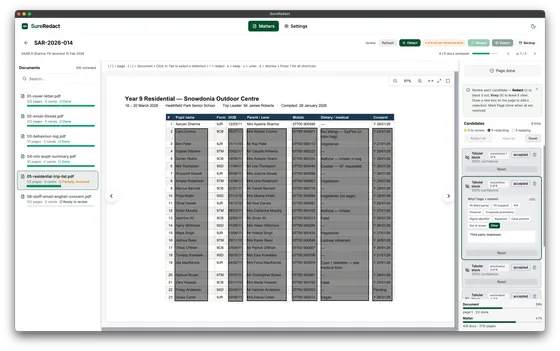
2. Full-page rasterisation. The page is rendered to a high-resolution raster image. The text layer, the comment layer, the annotation layer, the form-field layer, the embedded author metadata, the hidden text from OCR’d scans, the /Producer tag, the /Title, the /Subject, and every other piece of metadata that PDF readers can introspect — all of it is converted into a flat image. Not just the visible content; everything the file structurally contains.
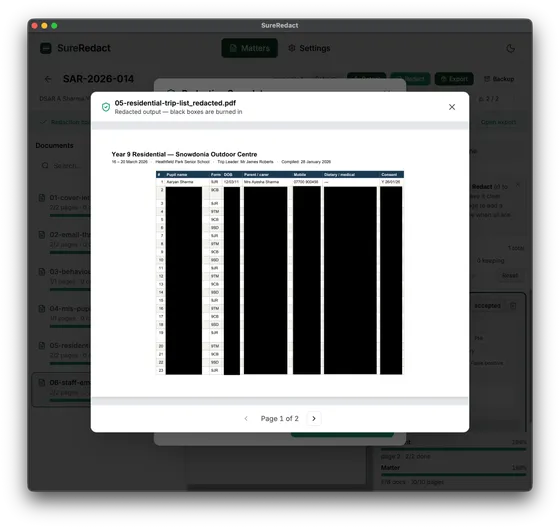
3. Redaction overlay rendered into the raster. The black box (or whatever shape the operator drew) is composited into the rasterised page at the pixel level. There is no text under the redaction. There is no annotation that can be deleted to reveal it. The redaction is part of the page’s image data.
4. Re-encode as PDF with the rasterised pages as image-only content. The output PDF contains the redacted pages as image-only PDFs — no underlying text, no annotation layer, no metadata layer carrying the original. New, sanitised metadata is written (we set /Producer to SureRedact <version>, scrub /Title / /Subject / /Author to operator-supplied or empty values, scrub the /CreationDate and /ModDate).
5. Audit log entry. The operator decision — what was redacted, where on the page, when, by whom, with what reason code — lands in the append-only decisions log. In Free, you get the redacted PDF plus a one-page audit summary; SureRedact Professional assembles the full disclosure pack — decisions log, manifest, and redaction certificate — alongside the redacted PDFs.
If you copy-paste from the resulting PDF, you get nothing. If you select-all-and-extract-text, you get nothing for the redacted regions. If you run a forensic PDF inspection tool against the file looking for hidden objects, you find an image-only PDF with nothing to recover.
What it costs
Forensic redaction has two costs: the redacted PDF is larger than the original (image-only encoding doesn’t compress as well as text+annotations), and the redacted PDF is no longer searchable in the redacted regions because the text layer is gone. These are the right trade-offs for a disclosure pack going to a regulator, a court, or a data subject. They are the wrong trade-offs for, say, an internal working document that needs to remain searchable. SureRedact is for the first case.
If the disclosure recipient needs the unredacted regions to be searchable, SureRedact Professional can re-instate the text layer for unredacted regions only — the redacted regions stay image-only and unrecoverable, while the rest of the document remains text-searchable. This is an opt-in Professional feature; the default is fully image-only because that’s the safer default for most disclosure use cases.
What we won’t do, and why
We won’t ship “annotation-overlay redaction” as a fast-mode option. It is the source of every famous redaction failure. The redaction button in SureRedact does forensic redaction or it doesn’t run.
We won’t auto-apply candidates without operator review. There is no API to enable this. There is no licence-tier that unlocks it. Per the AI Policy, the operator makes every final redaction decision; it’s a hard boundary, not a default we’d negotiate away in a custom enterprise contract.
We won’t accept work as redacted unless the operator confirmed it. The decisions log has no path to record an “auto-redacted” entry — every entry has an operator identifier or it doesn’t exist.
What the audit trail gives you
The decisions log records every redaction with timestamp, operator ID, before / after state, and reason code. During review it is append-only. When SureRedact Professional produces a disclosure pack, that log is sealed into a tamper-evident hash chain: any alteration to a decision after disclosure is detectable, and the pack carries the values an external auditor needs to verify the chain end-to-end. In Free, the redacted PDF comes with a one-page audit summary that includes the output hash.
If a regulator or a court asks “show me the audit trail of how this redaction was decided,” SureRedact Professional’s disclosure pack has the answer in machine-readable form — the append-only decisions log, sealed and packaged for external verification.
The case for “forensic by default”
Some redaction tools offer “fast mode” that uses annotation overlays. They keep the text layer, the metadata, the annotations — the whole structure of the original PDF — and just render a black rectangle on top. Fast mode is faster. Fast mode breaks more often than people expect.
The line we drew is: redaction is a binding act. The same way a paper-shredder is a binding act on a physical document. If a redaction can be undone — by extracting the text under the box, by reading the annotation layer, by running pdftotext against the file — it isn’t a redaction; it’s an obstruction. Disclosure packs going to data subjects, courts, or regulators need to bind. Forensic-by-default is the engineering posture that makes binding the default.
If you’ve worked in disclosure preparation for any length of time you have heard stories like the ones in the news. The redacted-but-not-really story is more common than the people in those stories would like. SureRedact treats the prevention of those stories as a feature, not a marketing line.
The other side: what we don’t fix
Forensic redaction prevents the redacted content from being recovered from the file. It does not prevent the operator from accidentally not redacting something — that’s the detection layer’s job, not the redaction layer’s. SureRedact’s detection covers signatures, phone numbers, email addresses, and credentials in the Free tier from launch, with the SAR vertical pack adding name-detected people, national identifiers, dates of birth, addresses, and similar redaction types from March 2027 onwards. Detection surfaces the suggestions; the operator confirms or rejects each one; the redaction is forensic on the confirmed ones.
If the detection layer misses a third-party name on page 47, the operator who reviewed page 47 should catch it. If the operator missed it too, the audit log will tell you who reviewed page 47, when, and what they decided. We make the audit trail forensic. We make the redaction forensic. We make detection comprehensive. Operator authority is the third leg of the stool — and it’s the one the regulator cares about most.
Simon is the founder of SureMatters. This post was drafted with Claude assistance and reviewed by Simon before publication, per the AI Policy §3.4.