SureMatters

SureRedact

Forensic redaction, fast.

Clear a SAR or FOI in minutes, on your own computer. Your documents never leave your laptop, and every redaction is your decision.

Free is here — Windows 1.1.0, macOS 1.0.1. Forever-free and genuinely unlimited for PDFs.

What it does

  • Detection — suggests redactions; you confirm each one.
  • Forensic redaction — burnt in at the pixel level — no text under the box.
  • Audit log — every decision recorded, tamper-evident.
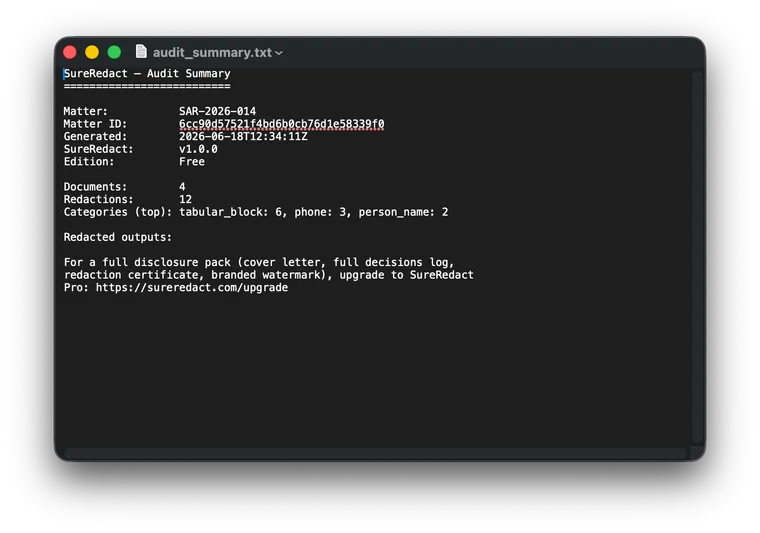
  • Output — redacted PDF plus a one-page audit summary.
  • Backup — manual .smbackup export and restore.

What we never do

  • Never send your documents to any third-party AI service per our AI Policy.
  • Never auto-apply a redaction without your review
  • Never phone home on save — updates and licence only
  • Never set tracking cookies

What it looks like

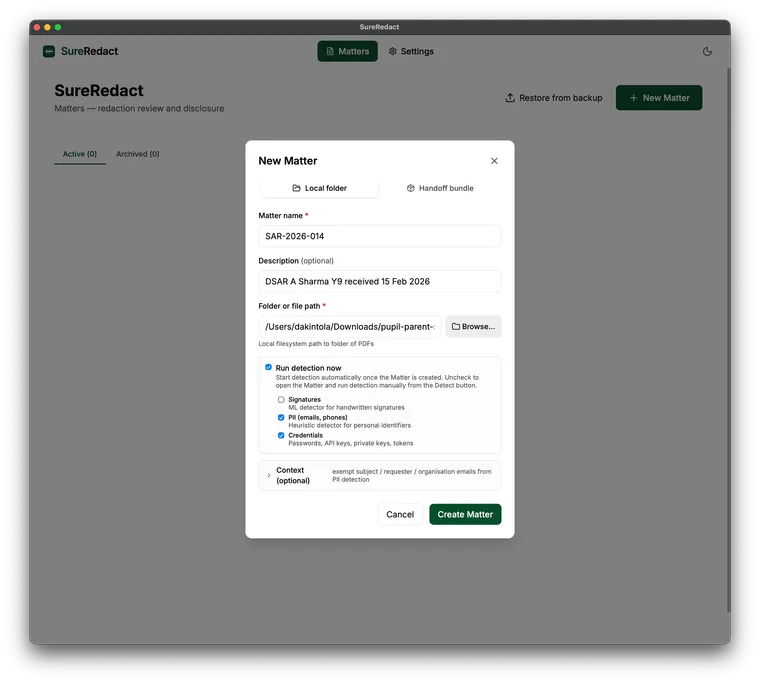
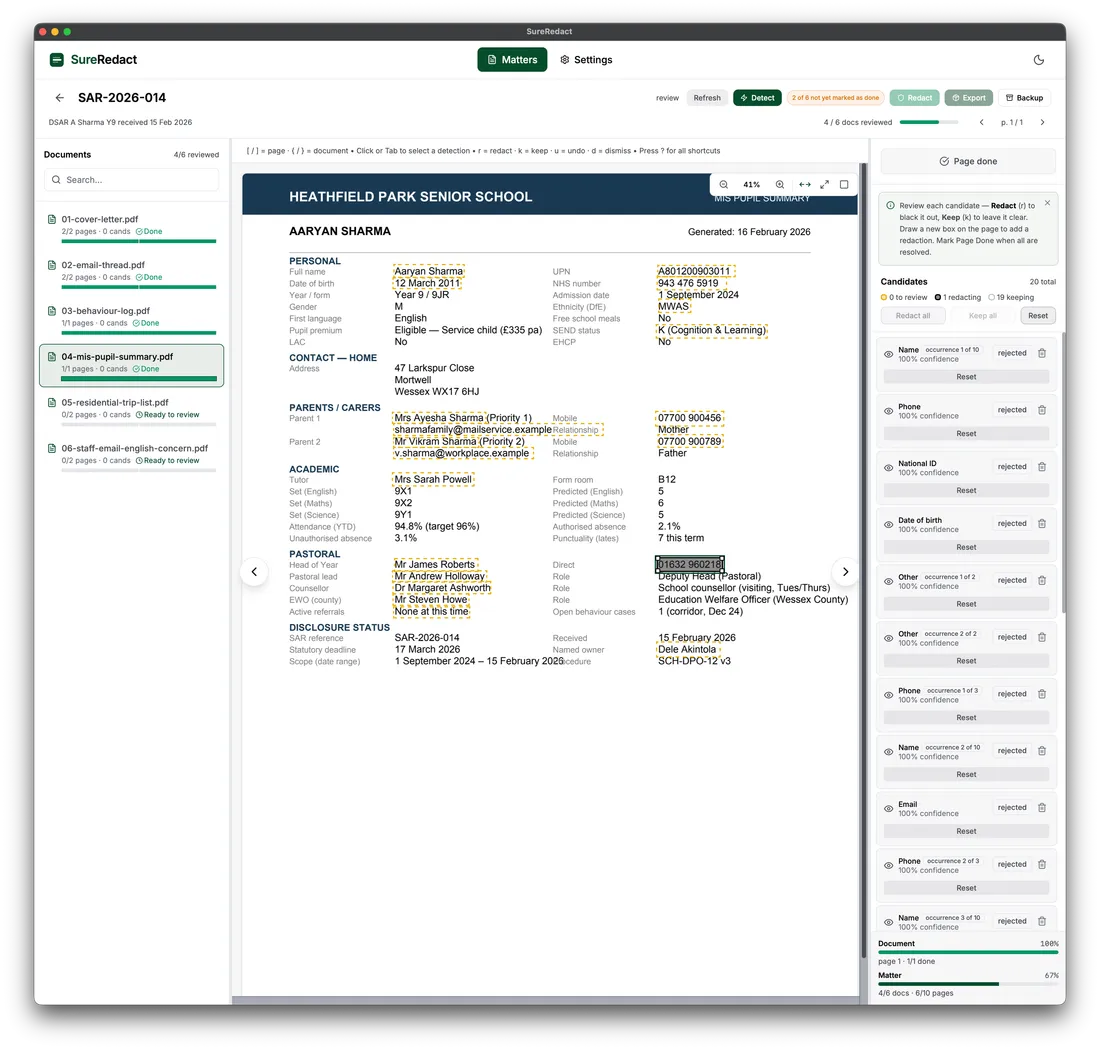
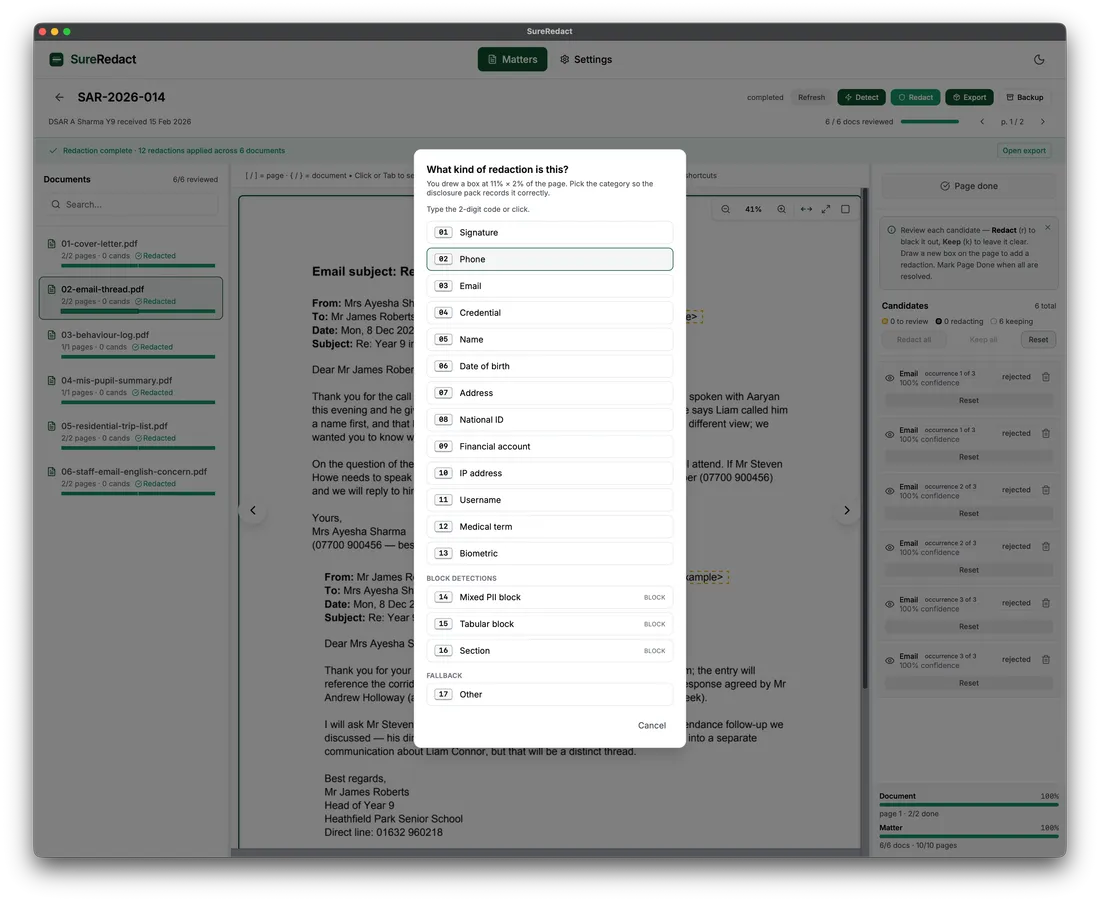
A fabricated test Matter, start to finish. No customer data appears in any of these screenshots.

The SureRedact New Matter dialog set to create a Matter from a local folder of PDFs
Creating a Matter from a local folder of PDFs. Fabricated test data.
The SureRedact reviewer showing a PDF page with detected redaction candidates listed in the side panel
The reviewer working through a fabricated test SAR. Detected candidates on the right; you confirm each one.
The SureRedact redaction-type picker listing the canonical redaction types for a manually drawn region
Marking a region by hand — choosing the redaction type from the full canonical list. Fabricated test data.
A text file showing the SureRedact one-page audit summary: matter details, redaction counts, and a category tally
The one-page audit summary that ships with every redacted PDF in Free. Fabricated test Matter.

What Free auto-detects

Nine more single types draw by hand in Free. Professional surfaces names and addresses for your review where a table or spreadsheet column is clearly and unambiguously labelled, plus dates of birth (where labelled as such) and UK postcodes; ambiguous tables and free-text prose stay with you, and the app shows you what it did not scan. Inline-prose detection comes with the Professional vertical packs (SAR pack from early 2027).

The full redaction-type list

The other nine single types — person_name, dob, address, national_id, financial_account, ip_address, username, medical_term, biometric — plus three combined types are all available for manual tagging in Free.

Professional already surfaces several of them for your review. Where a table or spreadsheet column is clearly and unambiguously labelled, it flags person_name and address; it also detects dob (dates of birth, where they are labelled as such — including in table columns) and UK postcodes wherever they appear. Tables whose headings are ambiguous, and free-text prose, stay with you — and the app shows you which regions it did not scan, so the gap is visible rather than assumed. The Professional vertical packs (optional add-ons for a specific kind of disclosure work) close that gap: the SAR pack from early 2027 adds inline-prose name detection and works out whose personal data each match is, with the FOI pack soon after and complaints, NHS-supplier, and HE to follow.

SureRedact Professional

£499 per user per year + VAT. Everyday-disclosure-work scale on top of Free.

Available now on Windows. macOS to follow. By direct enquiry — we email you a signed licence key that unlocks Professional in the build you already have.

Full Professional feature list

File-format breadth

Imports beyond PDF — converted to PDF on your own computer at import, via our converter; no third-party service in the path. Text content is preserved; the original layout, fonts and images are not reproduced, and you keep the original file.

  • Word, Excel, PowerPoint (.doc/.docx, .xls/.xlsx, .ppt/.pptx)
  • TXT, CSV, HTML
  • Individual email files (.eml) — for mailbox archives, SurePrepare handles those (from autumn 2026)
  • Image scans (JPG / PNG / TIFF / GIF / BMP)
  • Drag-and-drop import — by late 2026

Output workflow

  • Disclosure pack zip — manifest, decisions log, redaction certificate. The pack carries chain-verification hashes, so the decisions log can be checked end-to-end; the log is sealed at export.
  • Custom cover-letter templates

Integration and detection scale

  • SurePrepare Matter import — open a Matter that SurePrepare prepared, with its documents and context intact
  • Surfaces names and addresses for your review where a table or spreadsheet column is clearly and unambiguously labelled; ambiguous tables and free-text prose stay with you, and the app shows you what it did not scan. Dates of birth (where labelled as such) and UK postcodes wherever they appear
  • Finer-grained detection inside combined redaction blocks
  • Custom detection rules and bulk allow-list import

Governance and support

  • Configurable retention policy
  • Automatic backup before any irreversible action
  • External-folder backup (works with your existing cloud-sync setup)
  • Priority email support, founder-led onboarding, standard UK office hours

Before the redaction: SurePrepare

SureRedact does the redaction. The work that comes before it — searching for the material, deciding what is actually in scope, and being able to justify where the search stopped — is what SurePrepare does. It runs on your own computer too, and Professional opens a SurePrepare Matter directly, so the two meet without an export-and-re-import step in between. See SurePrepare →

For schools and MATs running SARs

A real, pressing need for SAR and FOI tooling that meets the regulatory perimeter without sending documents off the operator’s computer. For schools →

Forensic redaction, on your computer.

Free for PDFs, always. macOS and Windows, ready to download.

For your DPO, IG officer, or procurement reviewer

Common questions

Is SureRedact really free?

Yes for PDFs. Free is unconditional and unlimited for PDF redaction — no document caps, no page allowance, no watermarks, no time-limited trial. The Free tier auto-detects signatures, phone numbers, email addresses, and credentials, and gives you the full list of redaction types (thirteen) you can apply by hand from the manual-draw menu. Office files and image scans are handled by SureRedact Professional (£499 / user / year + VAT, annual only), which also surfaces names and addresses for your review where a table or spreadsheet column is clearly and unambiguously labelled — ambiguous tables and free-text prose stay with you, and the app shows you what it did not scan — along with dates of birth and UK postcodes, and adds disclosure pack output, SurePrepare Matter import, custom rules, vertical packs, and backup automation.

What is a Matter?

A Matter is the file that holds a single disclosure case — one SAR, FOI, EIR, complaint, or other piece of redaction work — together with its documents, the scope you set, and an append-only log of every decision you make. Each Matter is self-contained and stays on your own computer, so you can back it up, move it between machines, or restore it. A SureRedact seat is priced per user with unlimited Matters: work across as many cases as your caseload demands, with no per-Matter cost or cap.

What does “unlimited Matters” mean?

No trial period, no files-per-Matter cap, no limit on the number of Matters. A SureRedact seat lets you work across as many SARs, FOIs, EIRs, complaints, and other disclosure Matters as you need — the pricing is per user, not per Matter.

What are “regulated disclosures” and why are they important?

Regulated disclosures are formal requests UK law obliges organisations to answer within a deadline — Subject Access Requests (SARs) under UK GDPR and the Data Protection Act 2018, Freedom of Information (FOI) requests under freedom-of-information law, Environmental Information Requests, and complaints responses. Before documents go out, third-party personal information must be redacted; getting that wrong risks a complaint to the Information Commissioner’s Office and real harm to the people whose data leaks. The deadlines are tight (one month for a SAR, 20 working days for FOI) and the volumes keep rising — exactly the squeeze SureRedact is built to relieve.

Can I use SureRedact for non-regulated disclosures?

Yes. SureRedact Free is an unconditional PDF redaction tool — there’s no restriction on the kind of document or why you’re redacting it. Use it for SARs and FOIs, or equally for a contract, a board paper, a reference, or anything else you need to share safely. The same guarantees apply throughout: the work stays on your computer, you make the final call, and the redaction is burnt in at the pixel level.

Should AI make the redaction call?

No. SureRedact uses rules and on-device detection to suggest candidate redactions — a box over a signature, a phone number, an email — but it never applies them for you. You see each candidate and accept, edit, or reject it. There’s no setting, licence, or “auto-redact everything” button that takes you out of the loop; that’s a deliberate design choice, not a limitation we plan to lift.

Why is it important for a person to make the final redaction decision?

Because a disclosure is a decision about a real person’s information, and accountability for it sits with your organisation, not a tool. A person weighs context a detector can’t — whether a name is genuinely third-party, whether something is exempt, whether redacting it is proportionate — and under UK GDPR a decision with a significant effect on someone shouldn’t rest on automated processing alone. SureRedact’s job is to make that human decision faster and fully auditable, not to take it away; every decision is recorded in a tamper-evident log showing who decided what, and when.

I’m a professional office worker — do I need to be an IT-wiz to use SureRedact?

No. SureRedact is built for the people who actually carry the disclosure caseload — office managers, bursars, DPOs, IG officers, practice managers — not for IT specialists. It installs like any desktop application, runs on your own computer with no cloud account to set up, and the review is keyboard-first with shortcuts you can learn in a couple of minutes. There’s no manual to read before you start.

What file formats does SureRedact handle?

Free SureRedact handles PDFs unconditionally. SureRedact Professional adds Microsoft Office (Word, Excel, PowerPoint), TXT, CSV, HTML, individual email files (.eml), and image-to-PDF — all converted locally on your own computer at the point of import. Nothing is sent to a third-party service. The conversion preserves text content for redaction; it is not a pixel-faithful render of the original, and you keep the original file. For mailbox archives rather than single emails, that is SurePrepare’s job — it is (re)introduced from autumn 2026. Other formats are evaluated case-by-case; the contact form is the best route.

Does SureRedact need an internet connection?

No, not for the redaction work itself. SureRedact runs locally on your computer; redaction, detection, audit log, and disclosure pack output do not require an internet connection. Software updates, licence verification, and optional telemetry (the operational counts we collect about how the product is used; never document content, never personal data) use the network when the product is online; these never carry document content.

Which operating systems do you support?

macOS shipped on Wednesday 17 June 2026, requiring an Apple Silicon Mac running macOS 14.0 (Sonoma) or later. Windows (10 or 11, 64-bit) shipped on Wednesday 24 June 2026. Linux on the roadmap. ChromeOS support is under evaluation.

Where do my documents go when I use SureRedact?

Nowhere. SureRedact runs entirely on the operator’s own computer. Your documents do not transit SureMatters’ infrastructure under any tier or any add-on. We do not send them to OpenAI, Anthropic, AWS Bedrock, or any other AI service. Software updates, licence verification, and optional telemetry are the only outbound traffic the product makes, and none of those endpoints accept document content. See the AI Policy and the Security overview for the architectural detail.

How does the audit trail prove what happened?

Every operator action — opening a record, including, excluding, marking for review, applying a redaction, leaving an annotation — is written to an append-only decisions log with timestamp, identity, and before / after state. During review the log is append-only; when a disclosure pack is produced, that log is sealed into a tamper-evident hash chain, so any later change to a past entry is detectable. The disclosure pack carries the values needed to verify the chain end-to-end, so a third party (the data subject, your DPO, the ICO) can recompute the audit trail from the disclosure pack itself.

Can I undo a redaction?

Before you apply it, yes — candidate redactions are tentative until you confirm them, and confirming a redaction writes a log entry. After the redaction is applied to the output PDF, the pixels are gone (that is the point of forensic redaction); the audit log records what was redacted, by whom, and when. If you applied a wrong redaction, re-open the source record, correct the decision, and re-export; the audit trail shows both the original mistake and the correction.

Can we use a mix of SureRedact Free and Pro licences in our organisation?

Yes. Free is genuinely free for everyone and never expires, so anyone in your organisation can use it for PDF redaction at no cost. Professional is bought per user per year, and you buy only the seats you need — a colleague who handles the occasional redaction can stay on Free while those running the full disclosure-pack workflow are on Professional. There’s no requirement to put everyone on the same tier.

Can we pay by Purchase Order? Our finance team needs an invoice rather than a card payment.

Yes — a Purchase Order is how we sell SureRedact Professional today. Request a quote via the contact form (topic “Procurement / PO request”); we issue a quote with payment terms, you raise a PO referencing it, we invoice, and you pay by BACS bank transfer. We typically turn quotes around within one working day.

Request a procurement quote →

What payment terms do you support?

NET 30 by default. Payment is by BACS bank transfer against our invoice, for an annual subscription. Multi-year commitments attract a discount — 5% over three years, 10% over five.

Request a procurement quote →

Are there any hidden fees?

No. The list price is the price. We don’t charge for support, and we don’t charge per Matter, per page, per redaction, or per document.

How does fair-use on devices work?

Each licensed seat is intended for a primary operator. We apply fair-use on the number of devices a single seat is used from. A seat used from a noticeable number of devices (typically 5+) over 30 days shows a gentle reminder banner that does not block your work; we raise it with organisations whose device count substantially exceeds their seat count at renewal time. There are no hard caps that get in the way of your day-to-day workflow.

How do I buy SureRedact Professional?

SureRedact Free is available now — Windows 1.1.0 and macOS 1.0.1. SureRedact Professional is available now on Windows, with macOS to follow; it unlocks inside the same build with a signed licence key we email you. Buying is by direct enquiry — there is no self-service checkout yet and we have not committed to a date for one, so request a quote and pay by Purchase Order (see “Can we pay by Purchase Order?”). SurePrepare is in private pilot; apply via the contact form.

How do you handle support enquiries?

Substantive enquiries: 5 working days. Clarifications: 1 working day. Critical security issues: 1 working day. We are a small team and we read every message ourselves; AI assistance, where it helps draft a reply, is always reviewed by a named human before sending. The contact form and the inbox addresses (hello@, pilots@, privacy@, security@, policy@, legal@) are listed on the contact page.

Last updated . Feature and availability claims change between releases.