
By Simon (drafted with AI assistance) · Published 17 June 2026
SureRedact Free 1.0 is here
Free redaction software for SARs, FOIs, and regulated-disclosure responses. Runs locally on your own computer — the documents you load never leave it. Always free for PDFs, on macOS and Windows.
Updated 24 June 2026: SureRedact Free 1.0.1 has since shipped on macOS and Windows. See the 1.0.1 announcement for what’s new. The post below is the original 17 June launch-day record.
Updated 12 August 2026: the trust documents linked at the foot of this post have all been revised since — several of them corrected, because they described infrastructure we do not operate. Each carries its own version and date; read the live pages rather than the version numbers quoted below. The September 2026 target for legally-reviewed v1.0 versions is no longer a date we are publishing.
You can download SureRedact Free 1.0 from the SureRedact page today.
It’s for people who clear subject access requests, FOI and EIR responses, and other regulated disclosures with deadlines that don’t pause — DPOs, IG officers, school business managers and leaders, bursars, council case officers, anyone who’s spent an afternoon dragging black rectangles across a PDF in Acrobat.
Three things matter about it.
The documents you load never leave your machine. SureRedact runs locally on your Mac. There’s no cloud upload, no document-by-document processing somewhere else, nothing to disclose on a DPIA about a third-party service handling your data subjects’ personal data. The PDFs you redact stay where they were.
The redactions are forensic. When you save a redacted PDF, the black boxes are burnt into the page at the pixel level. There is no hidden text underneath them to copy-paste out. The metadata that often leaks through Acrobat’s redaction — original author names, filename history, document properties — is stripped from the output too. The file you send the requester is the file the requester sees.
You make every decision. SureRedact finds candidates and asks. It will not auto-apply a redaction. The reviewer is built so you can move through a long file quickly without taking your hands off the keyboard, but every black box on the final PDF was put there by a person looking at a page.
It’s free. No subscription, no trial countdown, no document cap, no watermark. The licence permits use for your disclosure work; not redistribution. Full text on the SureRedact licence page.
What it does
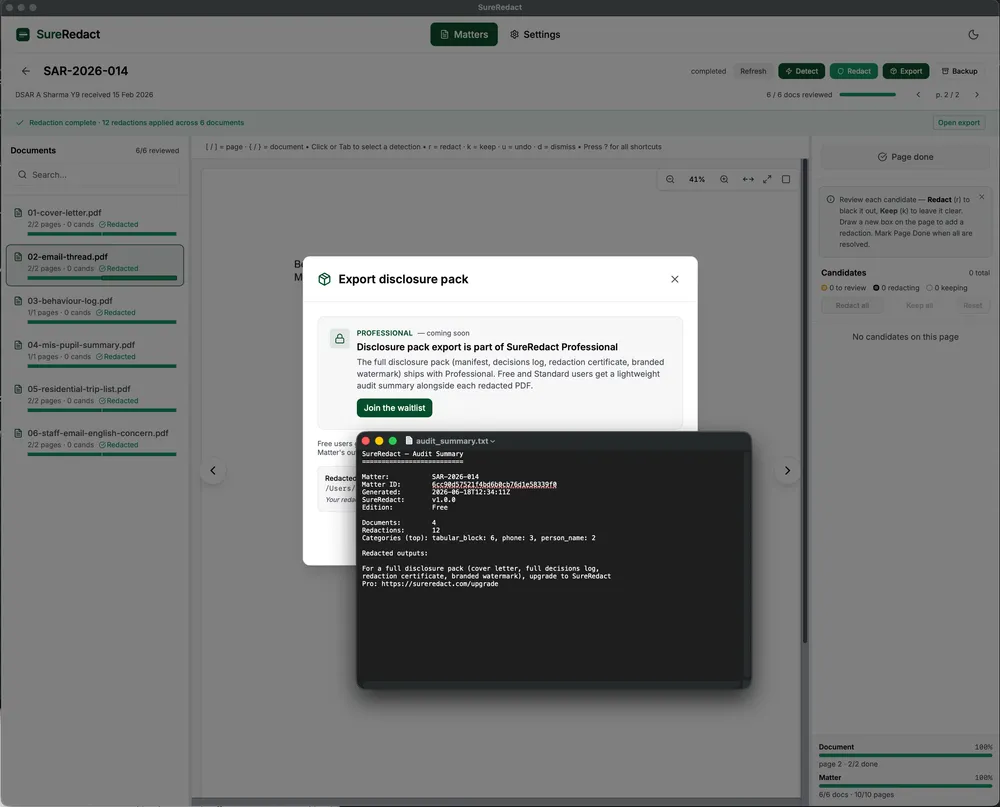
PDF in, redacted PDF out. Point SureRedact at a folder of PDFs on your computer — those become a Matter. Review the candidates the detector found, confirm or adjust each one, apply the redactions. You’ll get a redacted PDF and a one-page audit summary to keep with the case file.
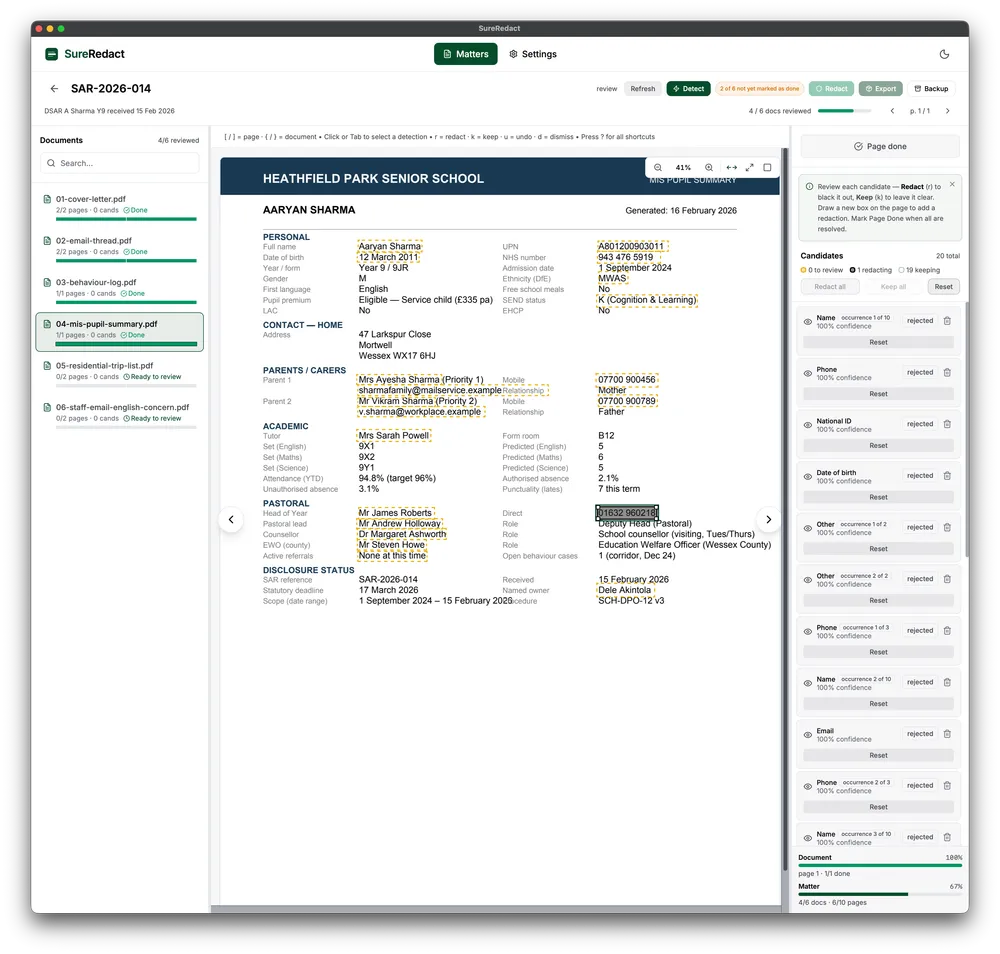
What it finds for you automatically. Handwritten signatures, phone numbers (UK and international), email addresses, and — for the rare but painful case where a password or access key was pasted into a document by accident — credentials that ought not to reach a SAR response in the first place. You confirm or adjust each candidate.
What you can mark by hand. Draw a box around anything else that needs redacting and tag what kind of personal data it is. SureRedact offers thirteen single categories (names, addresses, dates of birth, bank account numbers, NI numbers, medical references, and more) and three composite tags for mixed-PII regions and whole administrative sections — every box on the final file is recorded against its category.
Reason codes for the audit log. Mark whether you redacted something because it’s a third party’s personal data (PD-3P), out of scope of the request (OOS), an administrative duplicate (DUP-ADMIN), or another reason (OTHER). The audit log carries those reasons through to the summary file — the kind of audit a regulator asks for when they ask.
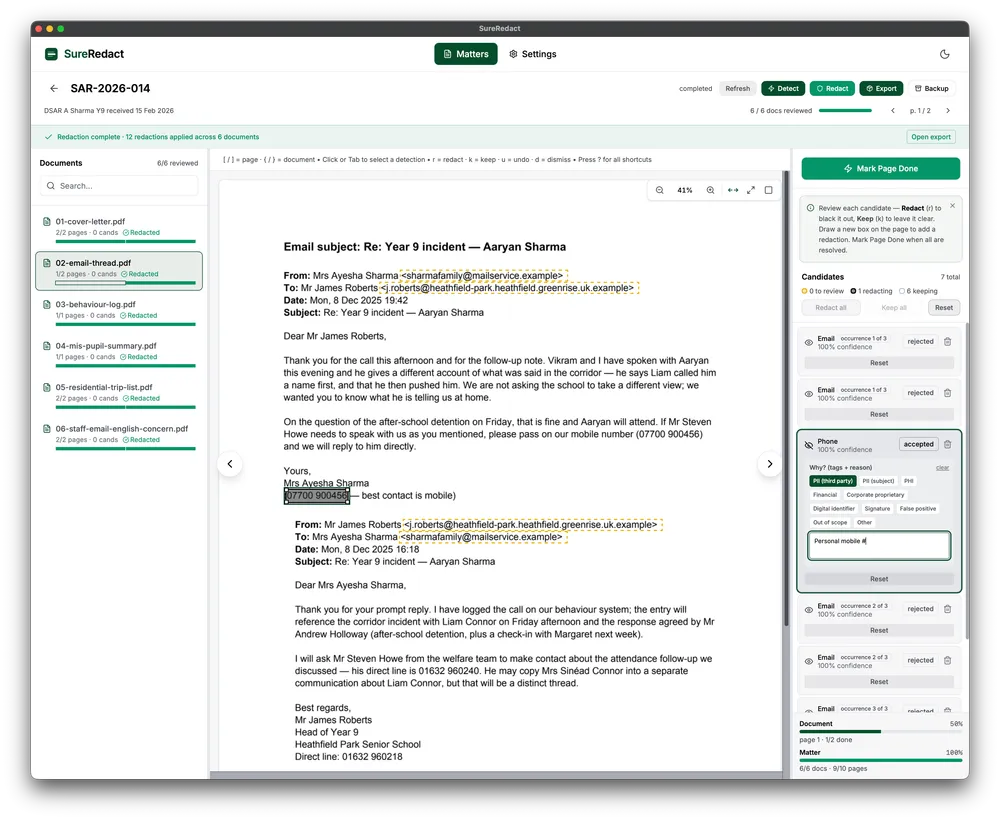
The reviewer runs from the keyboard. r to redact a candidate, k to keep it, u to undo, d to dismiss; [ and ] to walk through pages; ? for the rest. Once you’ve done a couple of SARs the reviewer feels invisible.
Light and dark themes. A high-contrast theme is still on the roadmap, but it is not in 1.1.0 — this post originally said it would arrive in 1.1, and that was wrong. We are not putting a date on it again until it is built. Accessibility is never a paid feature.
A safe backup of your work. Any Matter can be exported to a portable backup file and restored on another machine. Unconditional, with no setup — the safest move you can make before a long review session.
The longer what forensic redaction actually means post is there if you’d like the detail on why an image-based redaction is the only kind a regulator should accept.
What it does NOT do
Office documents. PDF only in Free 1.0. Word, Excel, and the rest are handled by SureRedact Professional, available now on Windows (macOS to follow) via direct enquiry. Professional converts those formats locally first and then redacts.
Automatic redaction. The detector finds candidates; you confirm each one. No model decides on your behalf what is or isn’t personal data; the operator’s eye on every box is the disclosure-quality guarantee. The boxes the detector draws are sometimes exactly right and sometimes slightly off the edge of the content underneath — that’s the reason you confirm each one, and the reason we tell you this honestly rather than market a “99%-accurate detector”.
Disclosure pack assembly. Free produces a redacted PDF and a one-page audit summary. The full disclosure pack — a zip with the manifest, the decisions log, a redaction certificate for your records, custom cover letters, your organisation’s watermark — is a Professional feature, available now on Windows (macOS to follow).
Windows. Late June 2026. The Windows build is just a couple of weeks away. The download page will carry the Windows link the moment it’s ready.
What’s in the box
SureRedact-1.0.0-macos.zip (~73 MB). Apple Silicon Mac running macOS 14.0 (Sonoma) or later. The download is signed and notarised under SureMatters Ltd’s Apple Developer ID — that means macOS recognises the app as known-good and you won’t see the “this app is from an unidentified developer” warning when you open it. The SHA-256 hash of the download is on the Downloads page; verify before you install if your IT team asks.
A licence-acceptance prompt appears on first launch; the full text stays inside the app at About → Licence, and at /legal/sureredact-licence.
Redacted files for each Matter land in ~/Documents/SureRedact/<matter-name>/ alongside the audit summary, so they’re easy to find in Finder.
Crash reports — paused for 1.0.0
Most desktop apps send basic crash reports back to the developer so we can spot and fix bugs quickly. We’re integrating that for SureRedact in 1.0.1 (within 1–2 weeks of today). We’ve deferred it from 1.0.0 deliberately: the rules that strip personal data out of a crash report before it leaves your machine need to be designed against real crashes from real operator use, not guessed at under launch-week pressure. Once it arrives, you’ll see an obvious off-switch in Settings, and turning it off will turn it off. The commitment is documented in our Telemetry Transparency Document — the public record of every category of data the app may ever send back to us — and the AI Policy.
What comes next
Bug fixes, fast. We’re monitoring hello@surematters.com, pilots@surematters.com, and security@surematters.com from today. If something breaks, please tell us so we can fix it.
Windows, late June.
SureRedact Professional, available now on Windows (macOS to follow) via direct enquiry. Professional adds Office document handling, the full disclosure pack output, custom detection rules, governance and backup automation, and priority support — for organisations that run disclosure work as a regular part of their week rather than once in a while. The pricing page carries the structure.
SAR-specific detection — third-party person names, pupil-identifier patterns, safeguarding-tag heuristics — arrives with the first SAR pack on Professional in early 2027.
For DPOs, IG officers, and procurement teams
If you’re evaluating SureRedact for an organisation that needs procurement-pack-grade artefacts, the AI Policy, the Telemetry Transparency Document, the security architecture summary, the sub-processor list, and the vulnerability disclosure policy are all public at v0.1 today. The DPIA template and the processor agreement template are available on request from policy@surematters.com. Legal review is in progress; v1.0 of each lands by end of September 2026. If you need anything before the end of September, email your request to policy@surematters.com.
Where to get it
Download SureRedact Free 1.0. macOS, signed and notarised, no sign-up required.